What is jujutsu?
A new version control system that may replace git in the future.
In the time I write down this article, the laster version of jujutsu is 0.39.0.
A typical git workflow
When I was in a global software company, we use agile workflow and TDD methodology.
Our daily work ware something like that:
- A quick standup meeting in the morning
- Pickup my task card
- Write code
- Use git pull to sync codebase from original repository
- Create a new git branch according to my task card ID
- Accomplish my task
- Create a PR and ask senior engineer to review
- Finished
So, in a tech company, a typical git workflow is like:
- Create a new branch to implement a new feature
- Commit changes
- Create a PR to merge your changes into main branch
- Review changes in PR
- Finished merge and delete the branch you created
It seems simple, right?
But wait, I may forgot something like resolve conflict, merge multiple branches, every time when I want to push my code to original repo, I need to resolve something like that.
When the codebase become larger and lager, the operation will be more and more complex.
Mental model between these two
I would like to say Git is like a multi direction graph.
While Jujutsu is like a linear path with some extra way.
Git
- staging area
- commit
- branch
In Git, every time when I want to commit my changes, I need to add the ordered file first.
Then write down some commit info and commit.
Jujutsu
- change
- bookmark
- undo
In Jujutsu, the way is changed.
Every changes will be a commit, because of its philosophy. I don’t need to add file and commit.
How to use jujutsu in local and use Git for remote repo?
I know jujutsu is something new for a lot of people, it cannot be the standard for most of the company now. The better way for us is use Git to collaborate with others and use jujutsu in the local, if you prefer the mental model that jj offered.
Init jj in a repo
First, we need to initialize jj in our repo, the --colocate option is used to make sure we use git as frontend for current repo. It can offer the capacity for both jj and git user.
jj git init --colocate
Checkout current status
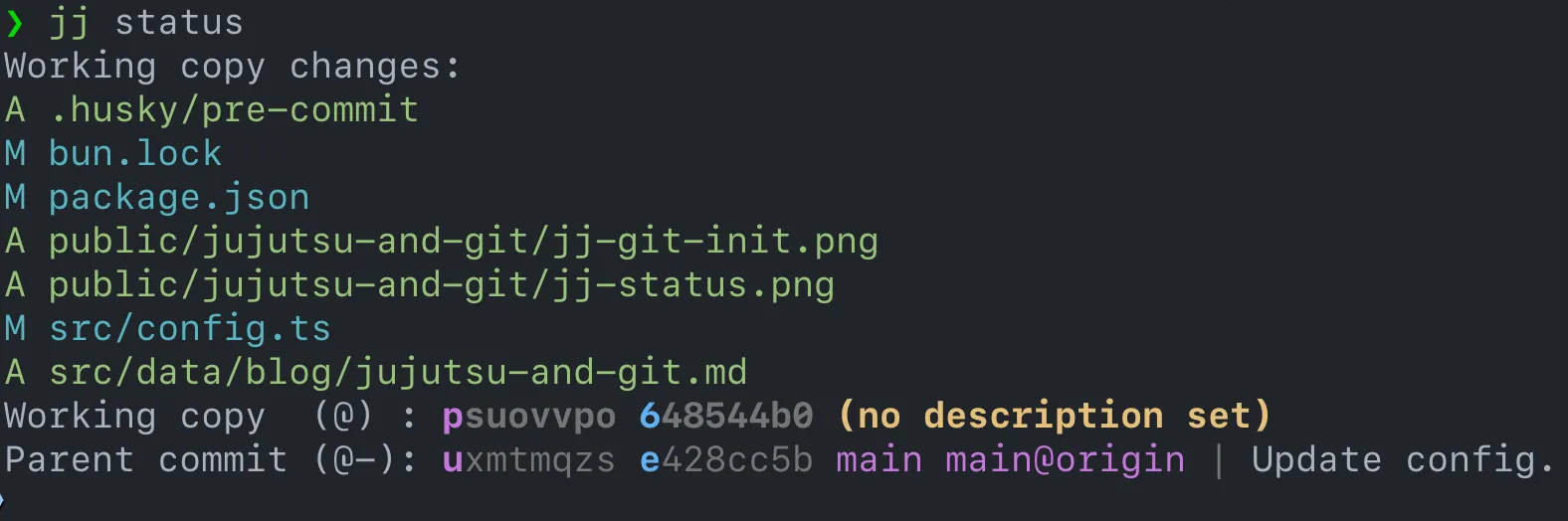
Use status command to show current changes in workspace.
jj statusAnd we can see each changes will act as a working copy in the info
Commit current changes
Use describe command to describe what we have done now.
This operation is equal to commit in the Git.
Every describe is a commit.
jj describe -m "message"Or enter default jj editor to edit message
jj describe
Checkout current log and see the changes

Undo and Redo
In Git, if we want to undo a commit, we need to use reset like:
git reset --soft HEAD^But in jujutsu, just need to type undo
jj undo
And if we want to redo in Git, we need to use the same message to commit again
git commit -m "xxxx"In jujutsu, just type redo
jj redo
Bookmark and Branch
In jujutsu, bookmark is like a branch in Git.
Create a bookmark.
jj bookmark create [bookmark-name]
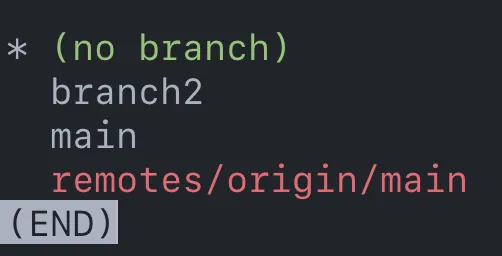
And we can see there’s something different at the time’s right side.

In Git, we can see a branch is created.
Go back to previous changes
@ used to represented current position
@--> previous committed changes@+-> newer stage
jj edit @-Push changes to remote repo
In jujutsu, bookmark is equal to branch in Git, and we use Git in the remote. So, before pushed, we need to assign a branch that can let remote repo recognize our operation.
If we want to push the changes into another branch, just set the ordered branch name.
# set branch name as main
jj bookmark set main
And just push.
jj git pushChange author info
Commit id is something sitting in the left. Refer to the purple character in previous picture.
jj metaedit --author "name <email@domain.com> commit id"Difference between jujutsu and git’s workflow
I ignore resolve conflict step for now.
git
- Create a new branch
- Write code
- Commit
- Push to remote repo
- Submit a PR
- Merge into main branch
- Delete current branch and switch to main branch
- Develop a feature follow the No.1 step again
jujutsu
- Write code
- Describe changes
- Push to Remote
- Request a PR
- Follow the No.1 step and develop new feature again
Why I think jujutsu is better git now?
AI Coding agent is more and more powerful now. So, what we can do is make the workflow become more kept to AI.
The undo and redo step is useful for human to fine-tune the code generated result from AI.
We don’t need to think about the branch, staged, commit. We just need to think about the changes for each step. Obviously, the linear commit is much more suitable for AI Coding. We don’t need such more branch to manage our codebase.
What about if we want to distinguished different customize version?
That’s easy, just take a bookmark like tag in the git.